


Sec 16(4) statutory timelines clash with new IMS automation, triggering automatic DRC-01C notices and permanent credit loss. Discover our proprietary IMS Matrix Reconciliation Protocol (IMRP)—a 5-stage framework designed to eliminate GSTR-2B mismatches and protect corporate working capital.
A critical conflict exists between the automated design of the IMS portal and the statutory time limits under Section 16(4) of the CGST Act, 2017. With e-invoicing parameters expanding, relying blindly on your auto-populated GSTR-2B figures is a dangerous strategy that frequently leads to system-generated DRC-01C mismatch notices. This deep-dive framework unpacks these hidden operational risks and offers a practical blueprint to safeguard your enterprise’s input tax credit lines.
This executive blueprint exposes the hidden operational vulnerabilities of IMS automation and provides a comprehensive, proprietary step-by-step implementation strategy designed to protect corporate working capital from permanent ITC lapses.
1. The Anatomy of the Trap: Dynamic Portal Logic vs. Statutory Code
To understand why this problem escapes standard automated accounting tools, one must analyze where portal code collides with statutory law. The IMS functions as a dynamic, transaction-level filter. It is designed to route invoice data based on user action or automated expiration clocks.
GST Section 16(4) Statutory Time Limit Guidelines
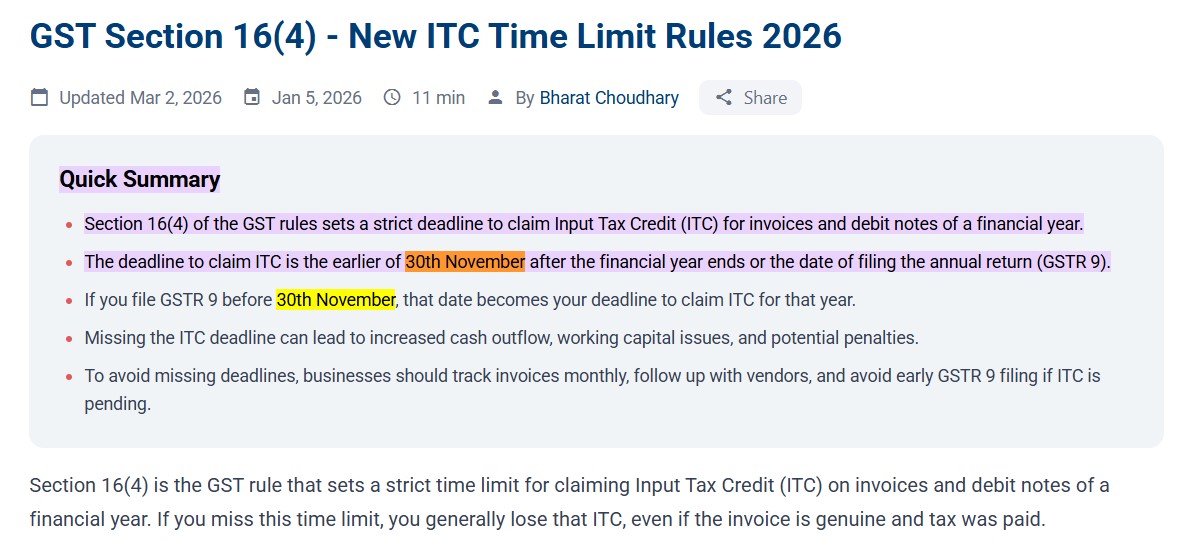
Caption: Source: Official Statutory Provision under Section 16(4) of the CGST Act.
For official legal reference, you can verify the latest government updates on the official GST council notifications directory.
Conversely, Section 16(4) operates as a statutory time-bar. It dictates an absolute calendar cut-off: no registered person can claim ITC on an invoice or debit note after the due date of filing the GSTR-3B for November of the subsequent financial year, or the filing of the relevant Annual Return, whichever is earlier.
The structural trap manifests through the IMS system default: Inaction equals Deemed Acceptance.
+------------------------------------------------------------------------------------------------------------------------+
|                                               THE DEEMED ACCEPTANCE TRAP                                               |
+------------------------------------------------------------------------------------------------------------------------+
|                                                                                                                        |
|       [ Supplier uploads historical, time-barred invoice in GSTR-1 ]                                                   |
|                                         |                                                                              |
|                                         v                                                                              |
|       [ IMS Interface processes record -> Sits under "No Action" status ]                                              |
|                                         |                                                                              |
|                                         v                                                                              |
|       [ Internal ERP matches the invoice against an open Purchase Order ]                                              |
|                                         |                                                                              |
|                                         v                                                                              |
|       [ Portal generates monthly GSTR-2B on the 14th of the month ]                                                    |
|                                         |                                                                              |
|                                         v                                                                              |
|       [ Inaction triggers "DEEMED ACCEPTED" status for the transaction ]                                               |
|                                         |                                                                              |
|                                         v                                                                              |
|       [ Invalid, time-barred ITC flows directly into GSTR-3B Table 4A5 ]                                               |
|                                         |                                                                              |
|                                         v                                                                              |
|       [ System-generated DRC-01C Notice issued automatically via Portal ]                                              |
|                                                                                                                        |
+------------------------------------------------------------------------------------------------------------------------+
If your corporate tax team is facing automated portal flags, you can deploy our practical strategy to stop DRC-01C notices and secure your monthly workflow.
Official GSTN IMS Dashboard Action States Matrix
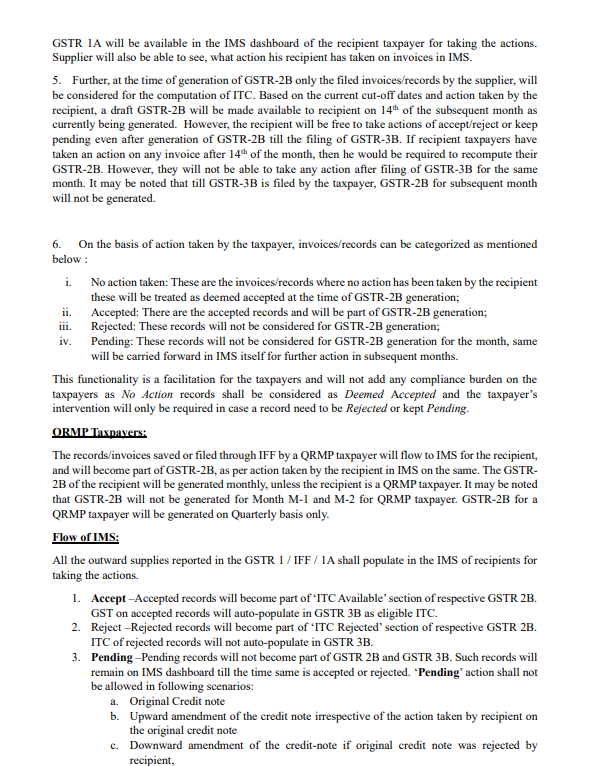
Caption: Source: Official GST Network (GSTN) Advisory on Invoice Management System (IMS) Functionality.
When a vendor uploads an overdue invoice from a prior financial year, the IMS dashboard accepts the record because the portal’s system validation rules do not block backward-dated entry streaming. If the recipient’s internal tax team does not actively flag this transaction before the generation of the monthly GSTR-2B, the portal automatically updates the status to Deemed Accepted.
This allows invalid, time-barred ITC to pass straight into Table 4(A)(5) of Form GSTR-3B. The system treats the transaction as valid based on its technical state, but the taxpayer remains entirely exposed to statutory violations. When the GSTN’s backend assessment algorithms run their automated cross-checks, a Form GST DRC-01C notice is issued, demanding immediate reversal plus 18% interest under Section 50.
Section 50 CGST Act Statutory Interest Rate
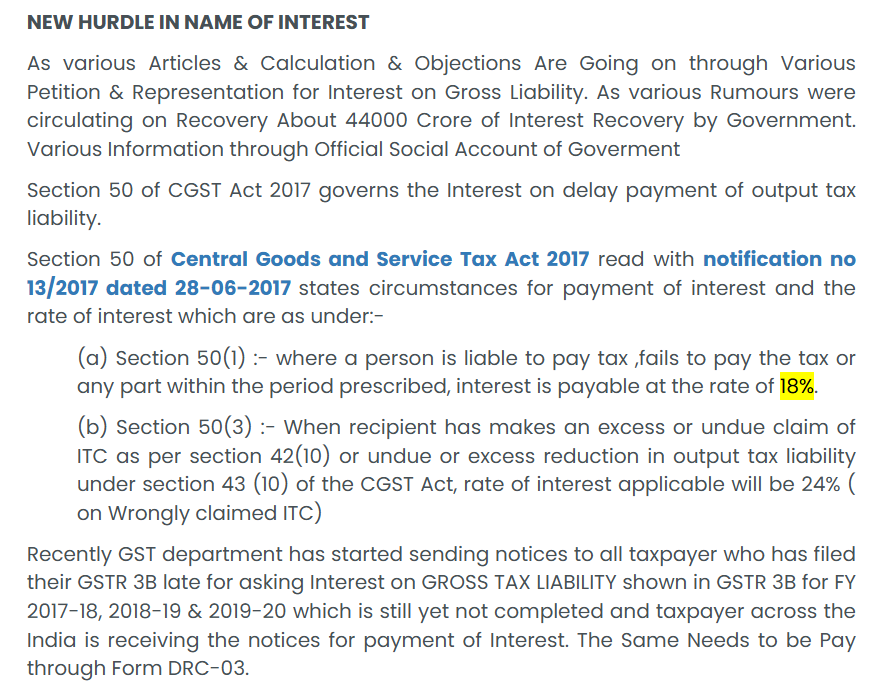
Caption: Source: Statutory Provisions of Section 50 of the CGST Act, 2017 read with Notification No. 13/2017.
2. The Deception of the ‘Pending’ Bucket
A widespread misunderstanding in corporate tax cells is that the Pending status on the IMS dashboard can be used to hold disputed vendor invoices indefinitely. Many accounting teams assume that if a transaction is marked Pending—whether due to a pricing disagreement, quality control check, or a delayed shipment—the statutory deadline under Section 16(4) pauses automatically.
This assumption is incorrect. The IMS is purely a data-routing mechanism; it has no authority to alter or extend deadlines established by core statutory law. If an invoice remains unresolved in the Pending bucket when the November 30th deadline hits, the IMS backend drops the transaction from the active ledger, causing the credit to lapse permanently.
If an invoice is categorized as Pending and remains unresolved as the November 30th statutory cut-off passes, the IMS architecture systematically removes the record from the active interface. The data is archived, the transaction pool locks, and the associated Input Tax Credit lapses permanently. The Pending flag acts as an operational pause button for return preparation, but it provides no protection against statutory expiration.
If your backend team needs an analytical deep-dive into how this specific time-bar behaves, read this detailed breakdown of Section 16(4) compliance limits.
The Mathematical Expiration of the Pending Pool
To mathematically compute the operational lifespan of any transaction parked in the Pending matrix before it reaches permanent statutory extinction, corporate systems must hardcode the following rule:
The Boundary Window: Pending Pool Expiration Math
Operational Override Rule: If your system detects that the Lifespan Remaining is ≤ 45 days, it must bypass the commercial verification pool and trigger an immediate portal intervention to prevent a permanent credit collapse.
Operational Rule: If {Lifespan Remaining} 45 { days} and internal reconciliation (PO/GRN validation) is still incomplete, the system must trigger a high-priority operational override to shift the record from Pending to an active processing state, preventing an absolute asset write-off.
3. High-Value Operational Breakdowns: Real-World Case Studies
To evaluate how these automated system actions disrupt daily corporate finance operations, we must examine two complex scenarios that standard enterprise software fails to intercept.
Case Study A: The Phantom Vendor Upload
A Tier-2 component supplier mistakenly selects your corporate GSTIN instead of a competitor’s during their bulk GSTR-1 filing. The transaction features an invoice value of ₹45 Lakhs. Because your internal automated matching scripts are specifically scanning for a corresponding internal Purchase Order (PO) or Goods Receipt Note (GRN), this mismatched invoice sits on your IMS dashboard with a status of No Action.
On the 14th of the month, the system changes this status to Deemed Accepted, inflating your active GSTR-2B pool by ₹45 Lakhs. If your tax team files the GSTR-3B by pulling the auto-populated totals directly from the portal, you claim credit for goods your enterprise never received, directly violating Section 16(2)(b). Correcting this error down the line requires manual entry overrides, exposing your file to structural audit flags.
Case Study B: The Borderline Cut-Off Dispute
A capital goods vendor delivers a specialized heavy machining unit in March. However, due to administrative backlogs, they do not upload the corresponding tax invoice until late October of the following financial year. The record appears on your IMS dashboard just weeks before the absolute Section 16(4) cut-off. At the same time, your internal engineering team is running quality assurance protocols and refuses to sign off on the asset approval.
To build a solid defense matrix against historical compliance gaps, check out our core framework to defend 16(4) notices using smart audit formulas.
The tax head faces a high-stakes choice:
- Select Pending to wait for engineering clearance, which risks crossing the November deadline and losing the ITC permanently.
- Allow a Deemed Acceptance or manual Accept to protect the credit line, Allow a Deemed Acceptance or manual Accept to protect the credit line, and temporarily park the credit in internal suspense ledgers until the physical receipt test mandated by Section 16(2)(b) is fully satisfied upon official engineering sign-off.
4. The Proprietary Solution: The IMS Matrix Reconciliation Protocol (IMRP)
To eliminate these vulnerabilities, corporate tax departments must shift from a passive, portal-driven approach to an assertive internal control architecture. The following step-by-step strategy—the IMS Matrix Reconciliation Protocol (IMRP)—details an operational workflow designed to secure complex data validation pipelines.
+------------------------------------------------------------------------------------------------------------------------+
|                                        THE IMS MATRIX RECONCILIATION PROTOCOL (IMRP)                                   |
+------------------------------------------------------------------------------------------------------------------------+
|                                                                                                                        |
|       STAGE 1: EXTRACT                                                                                                 |
|       Pull JSON from IMS API + Internal Book Ledger on Day 2, 5, and 9 of the month.                                   |
|                               |                                                                                        |
|                               v                                                                                        |
|       STAGE 2: FILTER & CALCULATE                                                                                      |
|       Apply the Statutory Expiration Formula:                                                                          |
|       Is (Current Date - Invoice Date) approaching the Section 16(4) cut-off?                                          |
|                               |                                                                                        |
|                               +------------------------+-----------------------+                                       |
|                               |                                                |                                       |
|                               v (YES)                                          v (NO)                                  |
|       STAGE 3A: AGE-BASED INTERVENTION                                 STAGE 3B: STANDARD MATCHING                     |
|       Is Invoice Date < April 1 of previous FY?                        Execute standard PO/GRN matching checks.        |
|                               |                                                |                                       |
|               +---------------+---------------+                                |                                       |
|               |                               |                                |                                       |
|               v (YES)                         v (NO)                           v                                       |
|       Enforce hard block on GSTR-2B.  Is GRN pending or missing?       Map directly to internal approval matrix.       |
|       Execute mandatory PORTAL REJECT.        |                                |                                       |
|                                       +-------+-------+                        |                                       |
|                                       |               |                        |                                       |
|                                       v (YES)         v (NO)                   |                                       |
|                               Push to Escrow.  Route to Active Claim.          |                                       |
|                                                                                |                                       |
|                               v                                                v                                       |
|       STAGE 4: DEPLOY LEGAL SAFEGUARDS                                                                                 |
|       Is manual override executed in GSTR-3B? Generate an automated electronic Audit Defense File.                     |
|                                                                                                                        |
+------------------------------------------------------------------------------------------------------------------------+
Stage 1: The Automated JSON API Extraction Routine
Do not rely on the manual web browser interface of the GST portal. Your IT infrastructure or tax technology suite must be configured to execute an automated JSON data dump from the IMS API on Day 2, Day 5, and Day 9 of every tax period.
To streamline your automated scripts, your IT team can review the official technical documentation on the GSTN API developer portal ecosystem.
This data stream must be instantly mapped into a staging table inside your ERP environment (such as Tally Prime, SAP, or custom database configurations) titled the IMS Un-Actioned Clearing Ledger.
Stage 2: Application of the Statutory Expiration Formula
Before any user attempts to assign a status on the portal, your system must apply a hard-coded algorithmic validation rule to every record inside the IMS clearing ledger. The formula evaluates the aging profile of the transaction:
Stage 2: The Age Threshold Validation Rule
Algorithmic Validation Rule: When your ERP system flags an invoice where the issue date predates April 1st of the previous financial year, the accounting system must automatically mark the record as a structural compliance risk. This ensures your data team catches historical entries before they contaminate your monthly credit routine.
When your ERP system flags an invoice where the issue date predates April 1st of the previous financial year, the accounting system must automatically mark the record as a structural compliance risk. This ensures your data team catches historical entries before they contaminate your monthly credit routine.
Stage 3: Executing Age-Based Portal Interventions
Once the aging profiles are mapped, the tax team executes actions based on clear, standardized operational rules:
- Rule 1: Immediate Portal Rejection for Legacy Records: Any invoice tagged as SECTION 16(4) EXPIRED must never be left under No Action. Your team must actively log into the portal—or deploy an API command—to mark the invoice as Rejected. This prevents the record from flowing into your GSTR-2B, cutting off the risk of an automated DRC-01C mismatch flag before it can generate.
- Rule 2: The Escrow Pending Routing Rule: For invoices that are legitimate but delayed due to internal commercial disputes or missing GRNs, do not select Pending if you are within 45 days of the November 30th cut-off. Instead, accept the invoice on the IMS portal to bring the data into your GSTR-2B pool, but block it from hitting your active GSTR-3B return. Route the value to an internal accounting account titled ITC Suspense Account – Pending Verification. This secures the credit line under statutory timelines while deferring the financial claim until internal parameters are satisfied.
GSTR-3B Table 4 Reporting of ITC Availment and Reversal format
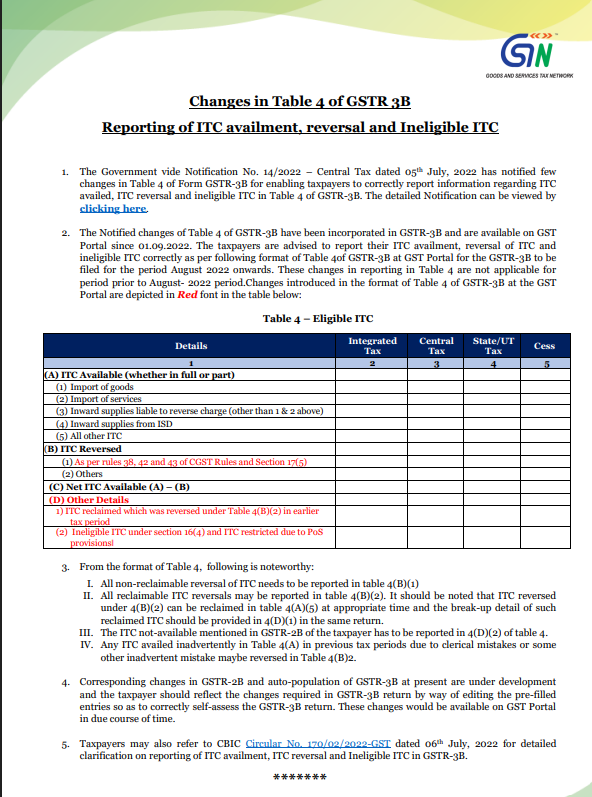
Caption: Source: Central Tax Notification and CBIC Circular No. 170/02/2022-GST on GSTR-3B Table 4 Reconciliations.
The Capital Exposure and Interest Risk Coefficient:
When deploying the Escrow Pending Routing Rule, corporate finance heads can calculate the potential financial liability of claiming borderline Input Tax Credit (ITC) prior to physical inventory sign-off using this liability matching equation:
FEL: The Capital Exposure & Interest Risk Coefficient
Strategic Application: If the internal financial modeling shows that FEL is lower than the outright loss of a permanent credit lapse, the algorithm mandates an immediate explicit “Accept” status on the IMS portal, routing the principal tax value to the ITC Suspense Account to secure the cash line while isolating the legal risk.
Strategic Application: If the internal financial modeling shows that FEL is lower than the outright loss of permanent credit lapse, the algorithm mandates an immediate explicit Accept status on the IMS portal, routing the principal tax value to the ITC Suspense Account to secure the cash line while isolating the legal risk.
Protecting corporate liquidity is crucial when routing disputed data. Learn how to avoid 1% cash tax payments to optimize your active working capital.
- Rule 3: Enforcing a Hard Rejection on Mismatched GSTINs: Any record appearing in the clearing ledger that cannot be verified against an internal corporate Purchase Order within 72 hours of discovery must be marked as Rejected. This disrupts the Deemed Acceptance loop, returning the tax liability back to the supplier’s interface.
Stage 4: Compiling the Audit Defense File
Whenever your accounting team manually adjusts the auto-populated data streams between Form GSTR-2B and Form GSTR-3B, the system must automatically generate a digital compliance capsule called an Audit Defense File.
This file must automatically group:
- The unique IMS transaction log ID showing the precise timestamp of the Rejected or Accepted action.
- The corresponding physical Goods Receipt Note (GRN) or internal inventory log.
- A system-generated ledger report showing that any temporary reversals were handled via Table 4(B)(2) rather than permanent disallowances.
This electronic documentation serves as your prepared response file, ready to be deployed the moment a system-generated notice lands on your corporate dashboard.
Stage 5: The Systemic Integrity Gateway
Before finalizing the GSTR-3B data payload for filing, corporate tax heads must verify that internal books and portal data reflect absolute balance. This system validation process screens the entire monthly transaction ledger using a dedicated integrity equation:
SDI: The Systemic Discrepancy Index for GSTR-3B
The Zero-Error Target (SDI = 0): To permanently shield your corporate file from automated DRC-01C mismatch triggers, the pipeline must reflect absolute mathematical parity. If SDI > 0, it signals unassigned or tracking deviations inside the portal queue that require manual intervention before filing.
To eliminate the risk of receiving an automated DRC-01C mismatch flag, your system’s target score must maintain absolute parity SDI = 0. Any positive variance indicates unverified historical invoices sitting unchecked in the auto-acceptance queue, requiring immediate manual intervention before submitting the return.
- The Zero-Error Target: To completely bypass a system-generated DRC-01C mismatch notice, the target score must maintain absolute balance:
Note: This math equation indicates a completely clean reconciliation loop with zero untracked exposure before filing.
If {SDI} > 0, it points to un-actioned or rogue legacy vendor entries sitting silently in the Deemed Accepted phase, requiring an immediate manual audit check before generating the final GSTR-3B payload.
5. Reference Matrix: System States vs. Statutory Outcomes
| Chosen IMS Action State | Direct Flow Path to GSTR-2B | Section 16(4) Expiration Impact | Risk Exposure Rating | Mandatory Accounting Entry Required |
|---|---|---|---|---|
| Explicit Acceptance | Streams into Eligible ITC Ledger. | Governed by standard statutory timelines. | Low Risk (Assumes verification is accurate) |
Debit: Electronic Credit Ledger Credit: GSTR-2B Clearing A/c |
| Inaction (Deemed) | Streams into Eligible ITC Ledger. | No Extension. Triggers automatic DRC-01C notices if original invoice is time-barred. | Critical Risk (Exposes business to penalties) |
Strictly Forbidden for unmatched or legacy vendor entries. |
| Pending | Retained within IMS Dashboard; blocked from 2B. | No Extension. Record is removed from portal if left unresolved past November 30th. | Moderate Risk (Can lead to permanent credit loss) |
No ledger entry; trace through Open Purchase Order Report. |
| Explicit Rejection | Moved to Rejected Pool; blocked from 2B. | Reversed back to Supplier’s ledger for correction. | Low Risk (Protects the buyer’s account) |
No ledger entry; issue formal notice to Vendor. |
📱 MOBILE USERS: SWIPE LEFT ⇋ RIGHT TO INSPECT THE FULL ARCHITECTURE MATRIX
Conclusion
The Invoice Management System provides a structured platform for data validation, but its automated features can mask significant compliance risks. For advanced tax professionals, relying on default automated processes is an unacceptable hazard. Protecting a business’s bottom line requires an active approach: building custom internal workflows, enforcing strict ERP controls, and recognizing that portal automation cannot replace statutory law.
Frequently Asked Questions (FAQs)
Q1: Does a Deemed Accepted status on the IMS portal provide a legal defense against a Section 16(4) non-compliance notice ?
No. The IMS portal is an administrative tracking tool, not a statutory authority. A status of Deemed Accepted simply reflects that no manual action was taken before the monthly cut-off. It does not validate the underlying legality of the ITC claim, leaving the taxpayer fully liable under audit.
Q2: If an invoice is marked Pending on IMS to await goods arrival, does it extend the time window under Section 16(4) ?
No. Marking a transaction as Pending merely pauses its movement into Form GSTR-2B for that specific month. It does not defer or pause the statutory timeline. If the invoice remains un-filed as the absolute November deadline passes, the credit line is erased and cannot be recovered.
Q3: How should an enterprise manage an incorrect invoice that has advanced via Deemed Acceptance into GSTR-2B ?
The taxpayer must execute a manual override during the preparation of Form GSTR-3B. The unverified credit amount must be entered under Table 4(B)(1) as a Permanent Reversal. Concurrently, the vendor must be notified to issue a formal Credit Note or execute a structural amendment using Form GSTR-1A.
Disclaimer: This executive framework is compiled strictly for analytical, educational, and informational purposes. GST compliance involves complex statutory provisions that change based on individual corporate structures and real-time portal updates. Readers must consult a qualified Chartered Accountant or certified legal expert before executing any major tax strategies.
Anurag Panchal

Founder & Chief Editor of ServiceMoney.in & AllRoundUpdate.com.
Specialist in Corporate GST Compliance, data analytics, and risk frameworks (Sec 16(4) & Rule 86B). Follow @Educationanurag for deep-dive analytical tax breakdowns.


