

GST compliance in 2026 has become a headache for many accountants because of strict GSTR-2B rules. If your data doesn’t match the portal, you get a DRC-01C notice immediately. At servicemoney.in, we receive many queries on how to handle this without expensive software. Today, I will show you how to master Excel GSTR-2B Reconciliation Automation using simple hacks, ensuring you get 100% ITC accuracy and complete peace of mind.
Excel GSTR-2B Reconciliation Automation 2026 Hacks
Caption : Stop manual errors and ITC leakage! Learn how to master GSTR-2B reconciliation using smart Excel automation hacks for 100% accuracy in 2026.
For Accountants, CAs, and Business Professionals, manual checking is obsolete. This guide provides a sophisticated Excel-based framework to automate your 2026 GST compliance.
1. The 2026 Compliance Shift: Why Precision is Mandatory
In 2026, the GST portal mandates 100% Data Congruence. The “5% provisional credit” cushion—which allowed taxpayers to claim a bit more than what appeared in the portal—is long gone. Today, the rule is simple: No 2B, No ITC.
The Variance Analysis Formula
To identify the gap between your accounting records and the portal, we use the core Variance ($\Delta$) equation:
THE ACCOUNTING EQUATION
- • If Δ = 0: Perfect Reconciliation. Proceed to file GSTR-3B.
- • If Δ > 0: Potential loss of credit. Your vendors have not filed their GSTR-1, or they have filed it incorrectly.
- • If Δ < 0: Unrecorded purchases. You might have received goods/services but missed entering the invoice in your ERP (Tally/SAP).
Alert : Remember: Even a small difference of ₹10 can stop you from claiming full ITC. Always check your ‘Suspense Account’ before running this formula in Excel.
2. Preparing Your Data: The Sanitization Phase (Deep Clean)
Raw data from Tally or SAP often contains non-printable characters, hidden line breaks, or accidental spaces that break Excel formulas like XLOOKUP. Before matching, you must calculate the Cleaned Value (Vc):
The Validation Process
Advanced Step for Professionals:
Sometimes, invoice numbers like INV/001 are entered as INV-001. To solve this, use the SUBSTITUTE function to remove special characters:
Excel Syntax:
=UPPER(TRIM(SUBSTITUTE(SUBSTITUTE(A2,"/",""),"-","")))
💡 Data Clean Tip: This formula removes slashes (/) and hyphens (-) automatically, ensuring a 100% match between Tally and the GST Portal.
- Why? This ensures that
INV/101andINV101match perfectly, saving you hours of manual correction.
Using Excel TRIM CLEAN for GST Data Sanitization.
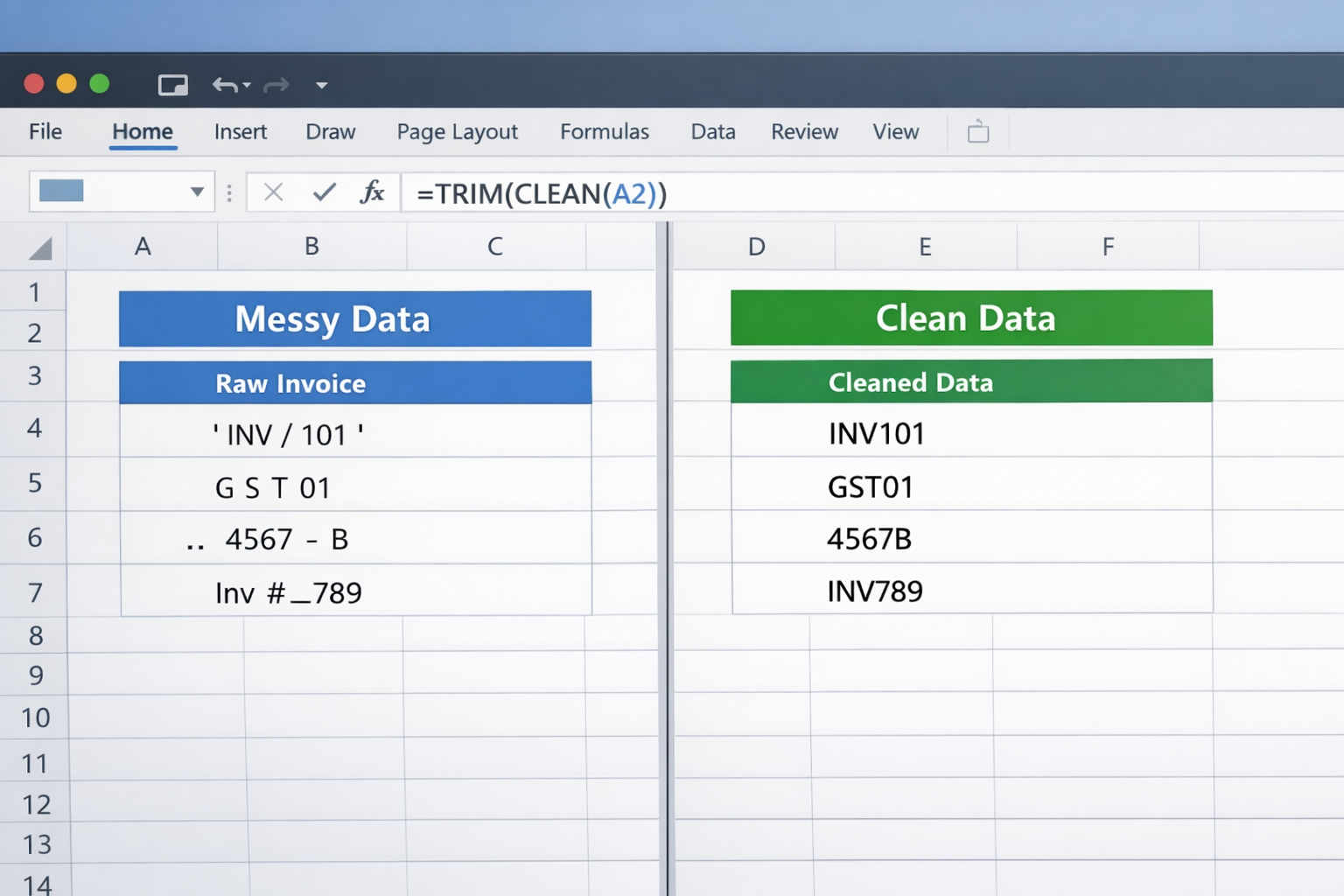
Caption: Sanitizing raw purchase data in Excel using TRIM and CLEAN functions to remove spaces.
3. Step-by-Step Excel Automation Process
Step A: Creating the “Concatenated Unique Key”
Since a single vendor can have multiple invoices, matching by GSTIN alone is not enough. We must create a Primary Key ($K$) by merging the GSTIN and Invoice Number.
=UPPER(TRIM(A2)) & "_" & UPPER(TRIM(B2))
💡 Quick Tip: Copy this formula to Column C of your Excel sheet for 100% matching.
Automation is the key to error-free accounting in 2026. While Excel helps with GST, you can further speed up your workflow by using AI Bank Reconciliation Hacks for Tally Prime. These advanced techniques help you sync bank statements instantly, ensuring your books are always ready for GST matching.
In Excel Syntax: =UPPER(TRIM(GSTIN_Cell)) & "_" & UPPER(TRIM(Inv_No_Cell))
Creating Excel Unique Key for GST Reconciliation.
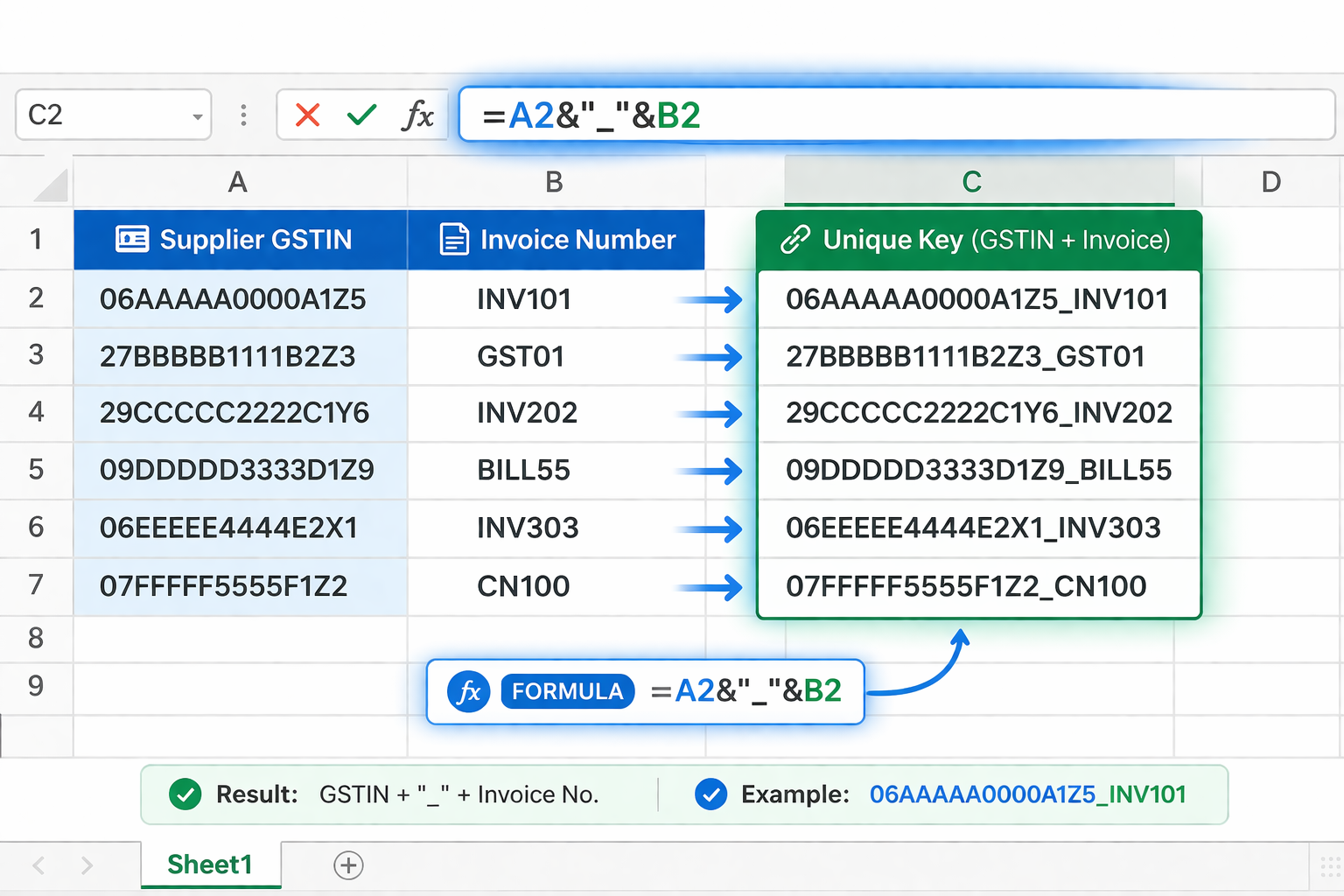
Caption: Creating a unique primary key by concatenating GSTIN and Invoice Number with an underscore.
Step B: The Advanced XLOOKUP Integration
Forget VLOOKUP. In 2026, XLOOKUP is the standard for speed and accuracy because it doesn’t break when you add new columns. Use this in your Purchase Register to pull data from the GSTR-2B sheet:
=XLOOKUP(K_Books, K_2B_Range, Tax_2B_Range, "Missing in Portal", 0)
💡 Pro-Step: This formula instantly identifies which invoices are not uploaded by your supplier on the GST portal.
Many users often ask why we prefer XLOOKUP over the traditional VLOOKUP method. According to the official Microsoft Excel Documentation, XLOOKUP is more powerful as it searches both vertically and horizontally. This official support makes it the most reliable function for handling complex financial data like GST reconciliation.
Automating GSTR-2B Matching with XLOOKUP
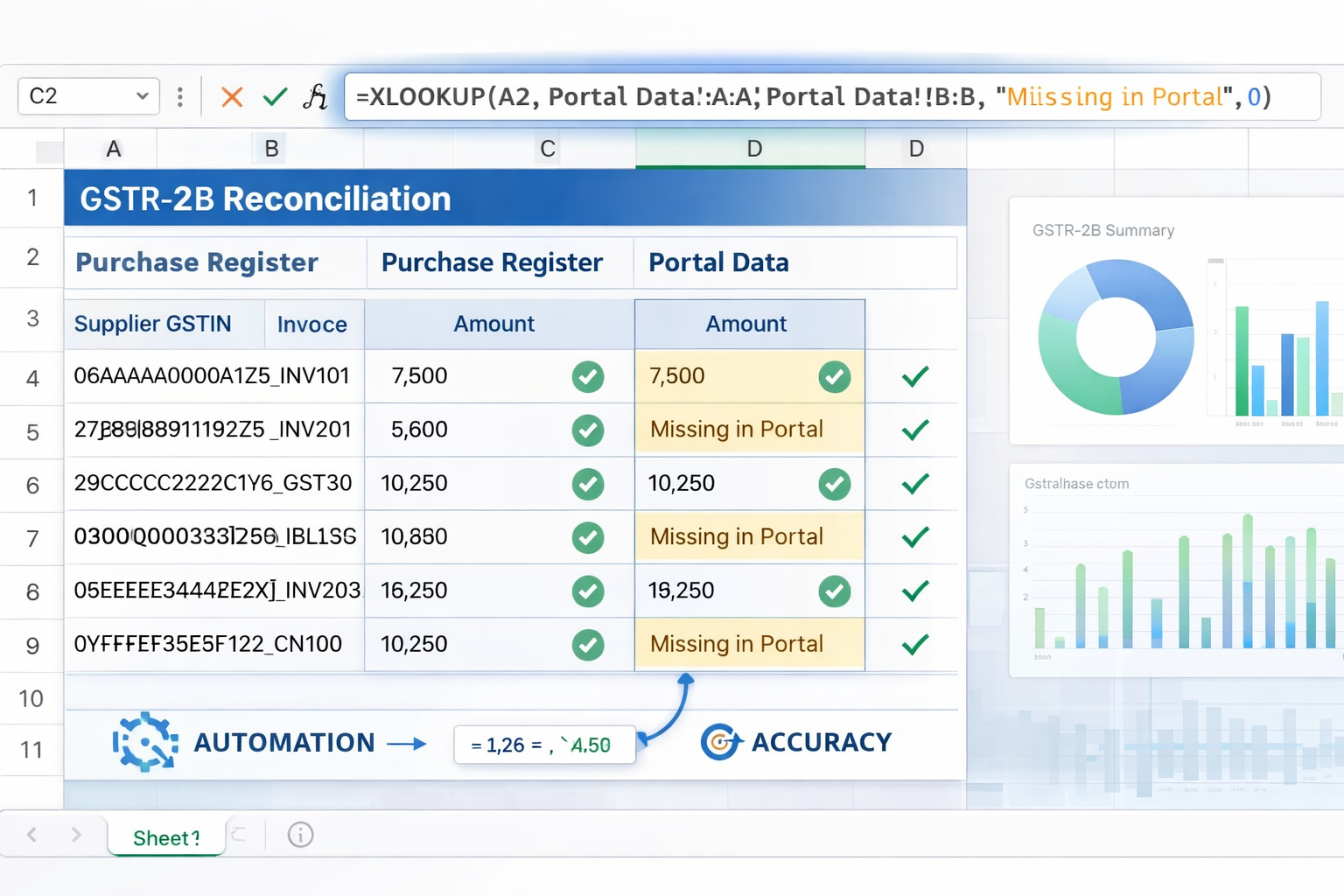
Caption: Automating the reconciliation process with XLOOKUP to identify invoices missing in the portal.
Real-life Tip: In my experience, 40% of mismatches happen because of a simple space or a ‘/’ in the invoice number. Don’t waste time manual-checking; use the formula I’ve shared below to clean 10,000 rows in seconds.
4. Handling Round-off Errors (The Tolerance Rule)
GST portals often round decimals differently than accounting software. In 2026, minor “paisa” differences should be auto-approved to avoid flagging for non-existent errors. We define a Tolerance ($T$) where $T = ₹1$.
Professional Logic: In Excel, use Conditional Formatting to highlight only the significant errors. This allows the CA to focus solely on high-value discrepancies.
It is important to remember that reconciliation should always align with current tax laws. To stay updated with the latest circulars on Input Tax Credit (ITC) eligibility and rounding-off rules, you can refer to the Central Board of Indirect Taxes and Customs (CBIC). Following these official guidelines ensures that your reconciliation report is legally compliant and ready for any future audit.
Final GSTR-2B Excel Report and Tolerance Rule.
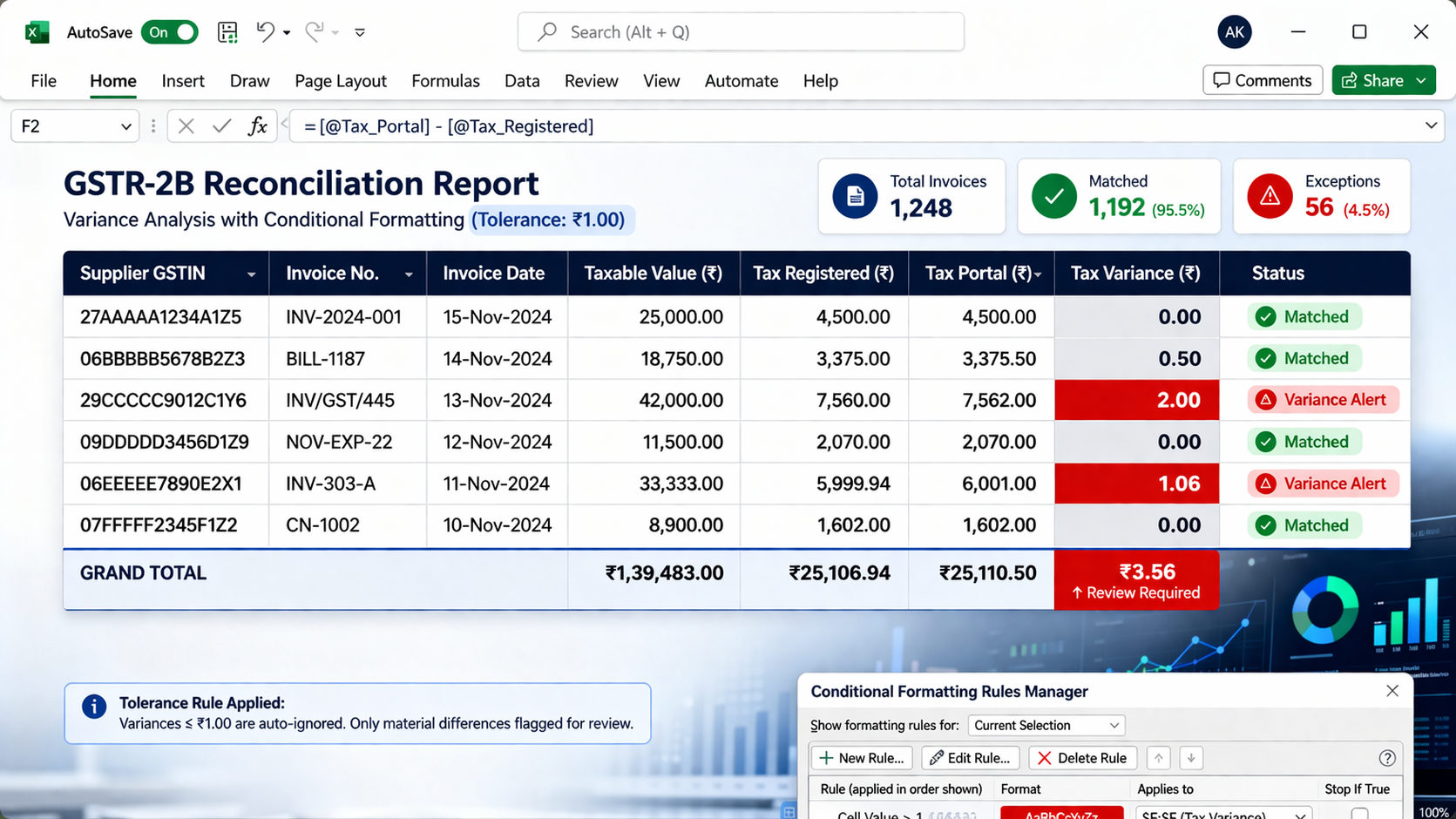
Caption: A professional GSTR-2B reconciliation report in Excel, highlighting variance alerts beyond the ₹1 tolerance limit.
5. Advanced Scenarios: The “Pro-Accountant” Edge
At servicemoney.in, we suggest maintaining a separate ‘ITC Tracker’ for Month Mismatches. If your supplier files in March for a February invoice, don’t ignore it—mark it as ‘Deferred ITC’ so you don’t miss the claim in April.
Suggetion : To stay ahead as a pro accountant, managing your data entry speed is just as important as reconciliation. To optimize your daily tasks, check out these 8 Essential Tally Prime Ledger Shortcuts for 2026. Mastering these shortcuts will help you prepare your purchase register faster, giving you more time for detailed GST analysis.
Scenario 1: The “Month Mismatch” (Timing Difference)
Sometimes an invoice dated February 28 is uploaded by the supplier on March 12.
- In Books: It’s in February.
- In 2B: It’s in March.
- Action: You must track these “In-Transit” invoices in a separate Excel tab to ensure they aren’t claimed twice or missed entirely.
Scenario 2: Amendment of Invoices (GSTR-1A)
If a supplier amends an invoice, the old Unique Key (K) will fail.
- Formula Tip: Use a wildcard search in XLOOKUP to find partial matches if the invoice number was slightly changed during an amendment.
Scenario 3: Reverse Charge Mechanism (RCM)
RCM invoices appear in GSTR-2B but you pay the tax yourself.
- Logic: ITC_{Books} for RCM must match the ITC_{Portal} RCM section specifically. Do not mix these with regular B2B ITC.
6. Categorizing Claimable ITC (Section 17(5))
Not every match in GSTR-2B is claimable. Under Section 17(5) of the CGST Act, certain credits are “Blocked.”
The Professional’s “Category” Table:
| Category | Eligibility | Example |
| :— | :— | :— |
| B2B Regular | Eligible | Raw materials, Office rent |
| Blocked 17(5) | Ineligible | Food & Beverages, Personal Vehicles |
| Capital Goods | Eligible | Plant & Machinery (Depreciation Check) |
| RCM | Eligible | GTA Services, Legal fees |
7. Strategic Audit Trail for CAs
In 2026, tax auditors look for the “Audit Trail” (Edit Log). When you reconcile in Excel, keep a “Remarks” column.
- Example Remark: “Mismatch of ₹500 due to Supplier wrong GST rate; Credit Note requested.”This provides a ready-made Tax Audit Working Paper, making you the most organized professional in the room.
8. Frequently Asked Questions (FAQ) – Deep Dive
Q1: What if a supplier is “Suspended” on the GST portal ?
Even if the invoice shows in 2B, if the supplier’s GSTIN is suspended, your ITC might be blocked. 2026 Tip: Use a web-query in Excel to check GSTIN status live.
Q2: How do I handle Debit/Credit Notes in Reconciliation ?
Treat Credit Notes as Negative ITC. Your Unique Key ($K$) for Credit Notes should include the original invoice reference to link them properly.
Q3: Is Excel better than automated software ?
For small to mid-sized businesses, Excel is superior because it allows for custom logic and manual overrides that software often automates incorrectly.
Related Read : If you are looking for more advanced ways to handle large data sets, you might find our specialized guide helpful. Learn how to perform an Automatic GSTR-2B vs Purchase Register AI Match in Tally Prime. This method is perfect for businesses that have thousands of invoices and need a more robust solution than standard Excel sheets.
9. Disclaimer
The information provided on servicemoney.in is for educational and guidance purposes. While we strive for absolute accuracy based on 2026 GST norms, tax laws are subject to rapid change. Always consult with a qualified Chartered Accountant before final submission of GSTR-3B.
Conclusion: Data Accuracy equals Financial Growth
Automating your GSTR-2B reconciliation isn’t just about saving time—it’s about Risk Management. In an era of AI-driven tax policing, your Excel sheet is your best defense. By mastering the XLOOKUP, Data Sanitization, and Variance Logic outlined here, you ensure that your business stays profitable and penalty-free.
Move beyond data entry. Start Financial Engineering.

